

Firmware Update
Overview
This download page is for Firmware in the displays.
Supported Displays
PN-M322
Update History
Checking the Necessity of Firmware Update
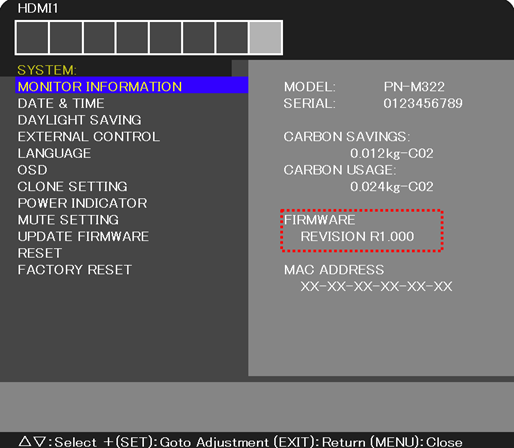
Check the Firmware version of the display from "MONITOR INFORMATION" on screen menu.
If either of the versions is older than the following versions, needs to update the Firmware.
| Firmware Version |
|---|
| Rev.1.2 REVISION:R1.202 |
OSD-SYSTEM-FIRMWARE
You can check the REVISION of your Firmware on the following OSD screen.
Updating
Updating Procedure by LAN cable and Computer.
Preparation
- LAN cable (Not supplied)
- Computer
(※ Connection method to the display from a computer, be sure to read "LAN Control" on the user's manual)
Follow the instruction below to update the Firmware.
| File Name | File Size |
|---|---|
| Firmware Update Procedure by HTTP Server PN-M322_Firmware Update Procedure by HTTP server_E(Rev.1.0).pdf |
829KB |
Updating Procedure by USB Memory.
Preparation
- USB Memory (Not supplied)
Updating of the firmware by USB memory.
Follow the instruction below to update the Firmware.
| File Name | File Size |
|---|---|
| Firmware Update Procedure by USB Memory PN-M322_Firmware Update Procedure by USB_E(Rev.1.0).pdf |
763KB |
Go to Download
Note: Download the compressed file from below and unzip the FIRMWARE image file.
The unpacked file includes the following one image file (PAC file).
| File Name | Unpacked File Name |
|---|---|
| Rev.1.2 Firmware download file FIRMWARE_M2_SERIES_R1202.zip(11.6MB) |
FIRMWARE_M2_SERIES_R1202.pac |